
Ingress
Overview
Applications are deployed in the kubernetes cluster and are accessible through the services. Application are accessible through the service and the node port on which that service is exposed. It is difficult for a client to remember this service name and port, they want a URL through which they can access the application. When the business grows and we have number of applications deployed on the same cluster, they all should be accessible through the generic URL. Ingress is used to address these requirements.
We will explore the Ingress in this blogs with 2 application and see how we can configure the application to the outer world so that it can be accessible with the URL.
Why Ingress
Initially Ingress was not part of the kubernetes configuration. In place of Ingress, there are NodePort and Load Balancer service were present. NodePort service expose a port on the Node, so that the application that is deployed on the pods are accessible through the <NODE_IP>:<NODE_PORT>. The main drawback with this approach is that the client must be aware of the the Node IP as well as the Node port, in order to use that service. Consider the case where we have many services, and exposed in many nodes. It is difficult to remember all those ip’s that belongs to the nodes.
That is why ingress comes into the action.
Architecture
We have 2 application with name Order and Billing and we will be defining the routes for the applications, so that these can be accessible from external world.
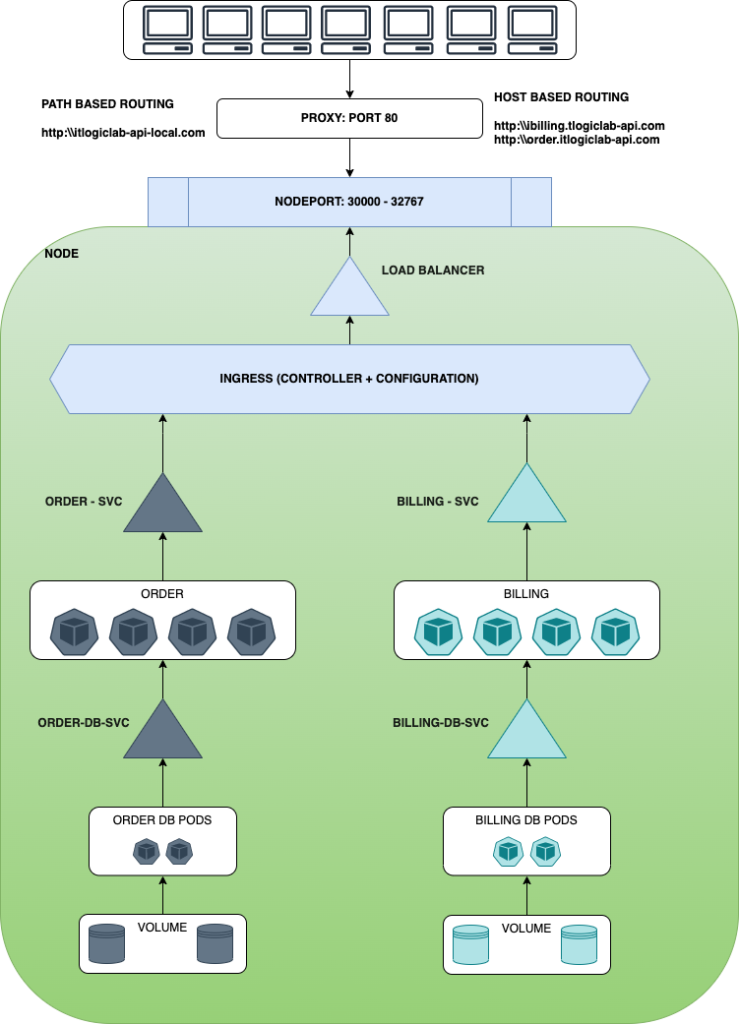
In above diagram, there is a green box, which represent a Node in the cluster. There are 2 services deployed in this node which is Order and Billing Service. Please refer the Order Microservice deployment here. Billing service is also similar to Order service, only the Rest URL and endpoints are different.
We will explore the Ingress Section on this diagram, which include the Ingress Controller and Ingress Configuration.
Ingress Controller
Ingress Controller is like a load balancer and it is used to fullfill the Ingress. Ingress Controller must have to satisfy the Ingress. Ingress configuration will not have any effect until we have Controller deployed. There are many ingress controller are available like Nginx, HAProxy, Contour, Traefik etc. We will be using Nginx as an ingress controller.
Ingress controller looks like the below.
apiVersion: apps/v1
kind: Deployment
metadata:
  name: itlogiclab-ingress-controller
  labels:
    app: itlogiclab-controller
spec:
  replicas: 1
  selector:
    matchLabels:
      name: itlogiclab-ingress
  template:
    metadata:
       labels:
          name: itlogiclab-ingress
    spec:
      containers:
        - name: ingress-container
          image: quay.io/kubernetes-ingress-controller/nginx-ingress-controller:0.21.0
          args:
            - /nginx-ingress-controller
            - --configmap=${POD_NAMESPACE}/nginx-configuration
          env:
            - name: POD_NAME
              valueFrom:
                 fieldRef:
                    fieldPath: metadata.name
            - name: POD_NAMESPACE
              valueFrom:
                  fieldRef:
                    fieldPath: metadata.namespace
          ports:
           - name: http
             containerPort: 8080
           - name: https
             containerPort: 443
There are many other configuration required for the ingress as
- ConfigMaps:
- ServiceAccount
- ClusterRole & ClusterRoleBindings
For the sake of simplicity, lets not include ServiceAccount, ClusterRole and ClusterRoleBindings right now.
ConfigMap Details look like this. This configMap is simple and have no configuration. Even we can exclude it from creating.
apiVersion: v1
kind: ConfigMap
metadata:
    name: itlogiclab-ingress-config
    labels:
        app: ingress-config
Ingress Rules
Ingress rules are the routing rules that describe how the traffic is routed to the application pods. There are two types of routing rules provided by the kubernetes.
Path Based Ingress Rule.
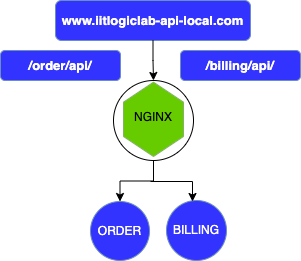
Ingress rules that are defined by the path can be used to access different application pods. /order/api path is mapped to access the order application, while /billing/api is used to access the billing pods.
Configuration
Path based routing is described as
apiVersion: networking.k8s.io/v1
kind: Ingress
metadata:
    name: itlogiclab-path-based-routing-rules
    namespace: default
spec:
  rules:
  - http:
     paths: ## Multiple path can be given to access to saperate service.
     - path: /billing ## to access bill-service, /billing is the path.
       pathType: Prefix
       backend:
        service:
           name: bill-service
           port:
             number: 20002 ## Port of the POD, not service.
     - path: /order  ## Order prefix in URL is mapped to order-service.
       pathType: Prefix
       backend:
        service:
            name: order-service
            port:
              number: 20001 ## Port of the POD, not service.
This ingress is describe the billing and order service and these service are mapped with the /billing and /order url.
Note:
Host Based Ingress Rule.
Configuration
Configuration for this Ingress can be described as
apiVersion: networking.k8s.io/v1
kind: Ingress
metadata:
  name: itlogiclab-host-based-routing-rules
  namespace: default
spec:
  rules:
    - host: order.itlogiclab-api.com. #Host for Order service
      http:
        paths:
          -  pathType: Prefix
             path: "/order/api/"
             backend:
              service:
               name: order-service
               port:
                number: 20001
    - host: billing.itlogiclab-api.com # Host for Billing service
      http:
        paths:
          - pathType: Prefix
            path: "/billing/api/"
            backend:
             service:
               name: bill-service
               port:
                number: 20002
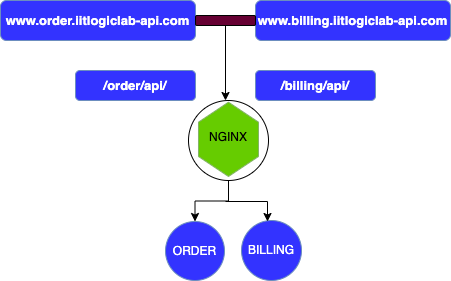
There is a slight difference of Host based routing against Path based routing. All the paths are under the host configuration in host based routing, while in path based routing we need to defined the path only.
Demonstration
Lets go through the small demonstration that how ingress work. We will be using the the application which is describe in the blog to validate it. We will deploy the ingress and application on minikube cluster.
As a prerequisite, we need to enable the ingress addons, if it is not already enabled, while minikube start. You can check the highlighted line with blue colour, if the ingress addons is enable.
(base) cpandey@Chandans-MacBook-Pro itlogiclab-restaurant-parent % minikube start
😄  minikube v1.25.2 on Darwin 11.6 (arm64)
✨  Using the docker driver based on existing profile
👍  Starting control plane node minikube in cluster minikube
🚜  Pulling base image ...
🔄  Restarting existing docker container for "minikube" ...
🐳  Preparing Kubernetes v1.23.3 on Docker 20.10.12 ...
    ▪ apiserver.service-node-port-range=32000-32767
    ▪ kubelet.housekeeping-interval=5m
🔎  Verifying Kubernetes components...
💡  After the addon is enabled, please run "minikube tunnel" and your ingress resources would be available at "127.0.0.1"
    ▪ Using image k8s.gcr.io/ingress-nginx/kube-webhook-certgen:v1.1.1
    ▪ Using image gcr.io/k8s-minikube/storage-provisioner:v5
    ▪ Using image k8s.gcr.io/ingress-nginx/controller:v1.1.1
    ▪ Using image k8s.gcr.io/ingress-nginx/kube-webhook-certgen:v1.1.1
🔎  Verifying ingress addon...
🌟  Enabled addons: default-storageclass, storage-provisioner, ingress
🏄  Done! kubectl is now configured to use "minikube" cluster and "default" namespace by default
(base) cpandey@Chandans-MacBook-Pro itlogiclab-restaurant-parent %
Ingress addons can be enable using the below command and we will get the following result.
>> minikube addons enable ingress(base) cpandey@Chandans-MacBook-Pro itlogiclab-restaurant-parent % minikube addons enable ingress
💡 After the addon is enabled, please run "minikube tunnel" and your ingress resources would be available at "127.0.0.1"
▪ Using image k8s.gcr.io/ingress-nginx/kube-webhook-certgen:v1.1.1
▪ Using image k8s.gcr.io/ingress-nginx/kube-webhook-certgen:v1.1.1
▪ Using image k8s.gcr.io/ingress-nginx/controller:v1.1.1
🔎 Verifying ingress addon...
🌟 The 'ingress' addon is enabledOne more thing, if you look at the result above, it says the ingress resource available at 127.0.0.1. We need to define a proxy here using host file. So edit your host file with and add the following details. I have defined 3 URL, you can name 127.0.0.1 anything
127.0.0.1 billing.itlogiclab-api.com ## Will be used for host based routing for bill application
127.0.0.1 itlogiclabs-api-local.com ## will be using it for path based routing
127.0.0.1 order.itlogiclab-api.com ## This will be used for host based routing for Order application.
We are good to go now. Now we will be deploying our applications and Ingress related configuration on this cluster.
Application Resources
Let run the following commands to run the applications. I am keeping it short and if you want it in details, check it out
kubectl apply -f ./deployment/order-deployment/mysql-deploy-definition.yaml
kubectl apply -f ./deployment/order-deployment/order-deploy-definition.yaml
Order application is up and running.
kubectl apply -f ./deployment/billing-deployment/mysql-deploy-definition.yaml
kubectl apply -f ./deployment/billing-deployment/bill-deploy-definition.yaml
Billing application is up and running. The status of the pods is mention as below.
(base) cpandey@Chandans-MacBook-Pro itlogiclab-restaurant-parent % kubectl get all
NAME                         READY   STATUS    RESTARTS      AGE
pod/bill-6b76545fc4-8cd4d    1/1     Running   2 (21s ago)   39s
pod/mysql-bill-server-0      1/1     Running   0             70s
pod/mysql-order-server-0     1/1     Running   0             7m3s
pod/order-7dfc84bc7c-kj56h   1/1     Running   0             3m7s

NAME                          TYPE        CLUSTER-IP       EXTERNAL-IP   PORT(S)          AGE
service/bill-service          NodePort    10.111.52.134    <none>        8080:32002/TCP   39s
service/kubernetes            ClusterIP   10.96.0.1        <none>        443/TCP          109d
service/mysql-bill-service    ClusterIP   None             <none>        3306/TCP         70s
service/mysql-order-service   ClusterIP   None             <none>        3306/TCP         7m3s
service/order-service         NodePort    10.109.250.207   <none>        8080:32001/TCP   3m7s

NAME                    READY   UP-TO-DATE   AVAILABLE   AGE
deployment.apps/bill    1/1     1            1           39s
deployment.apps/order   1/1     1            1           3m7s

NAME                               DESIRED   CURRENT   READY   AGE
replicaset.apps/bill-6b76545fc4    1         1         1       39s
replicaset.apps/order-7dfc84bc7c   1         1         1       3m7s

NAME                                  READY   AGE
statefulset.apps/mysql-bill-server    1/1     70s
statefulset.apps/mysql-order-server   1/1     7m3s
Ingress Resource
Lets deploy the ingress resources.
kubectl apply -f ./deployment/ingress/itlogiclab-ingress-configmap.yaml
kubectl apply -f ./deployment/ingress/itlogiclab-ingress-controller.yaml
kubectl apply -f ./deployment/ingress/itlogiclab-ingress-host-based-rules.yaml
kubectl apply -f ./deployment/ingress/itlogiclab-ingress-path-based-rules.yaml
Host based resource details
Lets check the result of the host based routing ingress
kubectl describe ing itlogiclab-host-based-routing-rules
Name:             itlogiclab-host-based-routing-rules
Labels:           <none>
Namespace:        default
Address:          192.168.49.2
Default backend:  default-http-backend:80 (<error: endpoints "default-http-backend" not found>)
Rules:
  Host                        Path  Backends
  ----                        ----  --------
  order.itlogiclab-api.com
                              /order/api/   order-service:20001 (172.17.0.5:20001)
  billing.itlogiclab-api.com
                              /billing/api/   bill-service:20002 ()
Annotations:                  <none>
Events:
  Type    Reason  Age                 From                      Message
  ----    ------  ----                ----                      -------
  Normal  Sync    84s (x2 over 2m2s)  nginx-ingress-controller  Scheduled for sync
If you look at it here, order based service are routed through the order.itlogiclab-api.com, and billing based service is routed through billing.itlogiclab-api.com host.
Path based ingress details
kubectl describe ing itlogiclab-path-based-routing-rules
Name:             itlogiclab-path-based-routing-rules
Labels:           <none>
Namespace:        default
Address:          192.168.49.2
Default backend:  default-http-backend:80 (<error: endpoints "default-http-backend" not found>)
Rules:
  Host        Path  Backends
  ----        ----  --------
  *
              /billing   bill-service:20002 ()
              /order     order-service:20001 (172.17.0.5:20001)
Annotations:  <none>
Events:
  Type    Reason  Age                   From                      Message
  ----    ------  ----                  ----                      -------
  Normal  Sync    4m33s (x2 over 5m6s)  nginx-ingress-controller  Scheduled for sync
Here any host can be any value and routing is based on path like /order/** and /billing/**
So now our Ingress details is in place and we are ready to test. I have create a test script for get and add and we can use that to test. Alternatively postman can also be used.
Add Records: Billing application
Adding records, I am executing script to add the record. I will provide the gitHub repo link at the bottom so that you can also check this.
./deployment/billing-deployment/test/addIngress.shThis script produce the following result.
ADD RECORD USING URL - HOST BASED ROUTING - http://billing.itlogiclabs-api.com/billing/api/add


{"billId":66,"customerId":1,"invoiceNo":"INV_1142","billAmount":2445.0,"date":"23//10//2022 14:25:45.222","orderId":2,"amount":2445,"status":null,"billInfoList":[{"billInfoId":67,"invoiceNo":null,"chargeName":"MAC","chargeCost":125000.0},{"billInfoId":68,"invoiceNo":null,"chargeName":"AIRPOD-2nd GEN","chargeCost":25000.0},{"billInfoId":69,"invoiceNo":null,"chargeName":"IPHONE-12","chargeCost":148000.0},{"billInfoId":70,"invoiceNo":null,"chargeName":"Apple Watch","chargeCost":42000.0}]}


ADD RECORD USING URL - PATH BASED ROUTING - http://itlogiclabs-api-local.com/billing/api/add

{"billId":71,"customerId":1,"invoiceNo":"INV_1142","billAmount":2445.0,"date":"23//10//2022 14:25:45.222","orderId":2,"amount":2445,"status":null,"billInfoList":[{"billInfoId":72,"invoiceNo":null,"chargeName":"AIRPOD-2nd GEN","chargeCost":25000.0},{"billInfoId":73,"invoiceNo":null,"chargeName":"MAC","chargeCost":125000.0},{"billInfoId":74,"invoiceNo":null,"chargeName":"Apple Watch","chargeCost":42000.0},{"billInfoId":75,"invoiceNo":null,"chargeName":"IPHONE-12","chargeCost":148000.0}]}
If you check the output, there are 2 records added with the above command.
- http://itlogiclabs-api-local.com/billing/api/add: This link produce the result for path based Ingress,
- http://billing.itlogiclabs-api.com/billing/api/add: This link produce the result for host based Ingress.
Add Records: Order application
Adding record for the order application using Ingress. We will execute the script
./deployment/order-deployment/test/addIngress.shThis command produce the following result.
ADD RECORD USING URL - HOST BASED ROUTING - http://order.itlogiclabs-api.com/order/api/add

{"orderId":5,"orderDate":"28052023","orderTime":"040801","deliveryAddress":{"line1":"2 Gatehall Dr","line2":"Route 10","city":"Parsippany","state":"NJ","country":"USA"},"status":"INQUEUE"}

ADD RECORD USING URL - PATH BASED ROUTING - http://itlogiclabs-api-local.com/order/api/add

{"orderId":7,"orderDate":"28052023","orderTime":"040801","deliveryAddress":{"line1":"2 Gatehall Dr","line2":"Route 10","city":"Parsippany","state":"NJ","country":"USA"},"status":"INQUEUE"}%
This command adding 2 records as describe
- http://order.itlogiclabs-api.com/order/api/add. : Record added by the URL represent the host based Ingress.
- http://itlogiclabs-api-local.com/order/api/add : Record added by this URL represent the path based Ingress
Fetch Record: Billing Application
Executing the following command to fetch the billing record. while adding the record, bill id 66 and 71 is persisted in the database. Lets check these records with the give command
./deployment/billing-deployment/test/getIngress.sh 66 ##Fetch the record for bill ID 66
./deployment/billing-deployment/test/getIngress.sh 71 ##Fetch the record for bill ID 71
./deployment/billing-deployment/test/getIngress.sh ##Fetch all the records.
This command produce the following output
GET RECORDS USING URL - PATH BASED ROUTING - http://itlogiclabs-api-local.com/billing/api/get/66

{"billId":66,"customerId":1,"invoiceNo":"INV_1142","billAmount":2445.0,"date":"23//10//2022 14:25:45.222","orderId":2,"amount":2445,"status":null,"billInfoList":[{"billInfoId":68,"invoiceNo":null,"chargeName":"AIRPOD-2nd GEN","chargeCost":25000.0},{"billInfoId":70,"invoiceNo":null,"chargeName":"Apple Watch","chargeCost":42000.0},{"billInfoId":67,"invoiceNo":null,"chargeName":"MAC","chargeCost":125000.0},{"billInfoId":69,"invoiceNo":null,"chargeName":"IPHONE-12","chargeCost":148000.0}]}

GET RECORDS USING URL - HOST BASED ROUTING - http://billing.itlogiclab-api.com/billing/api/get/66

{"billId":66,"customerId":1,"invoiceNo":"INV_1142","billAmount":2445.0,"date":"23//10//2022 14:25:45.222","orderId":2,"amount":2445,"status":null,"billInfoList":[{"billInfoId":68,"invoiceNo":null,"chargeName":"AIRPOD-2nd GEN","chargeCost":25000.0},{"billInfoId":67,"invoiceNo":null,"chargeName":"MAC","chargeCost":125000.0},{"billInfoId":70,"invoiceNo":null,"chargeName":"Apple Watch","chargeCost":42000.0},{"billInfoId":69,"invoiceNo":null,"chargeName":"IPHONE-12","chargeCost":148000.0}]}

GET RECORDS USING URL - PATH BASED ROUTING - http://itlogiclabs-api-local.com/billing/api/get/71

{"billId":71,"customerId":1,"invoiceNo":"INV_1142","billAmount":2445.0,"date":"23//10//2022 14:25:45.222","orderId":2,"amount":2445,"status":null,"billInfoList":[{"billInfoId":75,"invoiceNo":null,"chargeName":"IPHONE-12","chargeCost":148000.0},{"billInfoId":72,"invoiceNo":null,"chargeName":"AIRPOD-2nd GEN","chargeCost":25000.0},{"billInfoId":73,"invoiceNo":null,"chargeName":"MAC","chargeCost":125000.0},{"billInfoId":74,"invoiceNo":null,"chargeName":"Apple Watch","chargeCost":42000.0}]}

GET RECORDS USING URL - HOST BASED ROUTING - http://billing.itlogiclab-api.com/billing/api/get/71

{"billId":71,"customerId":1,"invoiceNo":"INV_1142","billAmount":2445.0,"date":"23//10//2022 14:25:45.222","orderId":2,"amount":2445,"status":null,"billInfoList":[{"billInfoId":73,"invoiceNo":null,"chargeName":"MAC","chargeCost":125000.0},{"billInfoId":75,"invoiceNo":null,"chargeName":"IPHONE-12","chargeCost":148000.0},{"billInfoId":72,"invoiceNo":null,"chargeName":"AIRPOD-2nd GEN","chargeCost":25000.0},{"billInfoId":74,"invoiceNo":null,"chargeName":"Apple Watch","chargeCost":42000.0}]}
Fetch Record: Order Application
Same command is to be executed. Since order id 5 and 7 were created while add, so we will try to fetch the same record.
./deployment/order-deployment/test/getIngress.sh 5  # Fetch the record for id 5
./deployment/order-deployment/test/getIngress.sh 7  # Fetch the record for id 7
./deployment/order-deployment/test/getIngress.sh    # Fetch all the records
Above command produce the following result
GET RECORDS USING URL - PATH BASED ROUTING - http://itlogiclabs-api-local.com/order/api/get/5

{"orderId":5,"orderDate":"28052023","orderTime":"040801","deliveryAddress":{"line1":"2 Gatehall Dr","line2":"Route 10","city":"Parsippany","state":"NJ","country":"USA"},"status":"INQUEUE"}

GET RECORDS USING URL - HOST BASED ROUTING - http://order.itlogiclab-api.com/order/api/get/5

{"orderId":5,"orderDate":"28052023","orderTime":"040801","deliveryAddress":{"line1":"2 Gatehall Dr","line2":"Route 10","city":"Parsippany","state":"NJ","country":"USA"},"status":"INQUEUE"}%

GET RECORDS USING URL - PATH BASED ROUTING - http://itlogiclabs-api-local.com/order/api/get/7

{"orderId":7,"orderDate":"28052023","orderTime":"040801","deliveryAddress":{"line1":"2 Gatehall Dr","line2":"Route 10","city":"Parsippany","state":"NJ","country":"USA"},"status":"INQUEUE"}

GET RECORDS USING URL - HOST BASED ROUTING - http://order.itlogiclab-api.com/order/api/get/7

{"orderId":7,"orderDate":"28052023","orderTime":"040801","deliveryAddress":{"line1":"2 Gatehall Dr","line2":"Route 10","city":"Parsippany","state":"NJ","country":"USA"},"status":"INQUEUE"}
So in this way we can make use of the Ingress to build a complete request response cycle without memorising the node’s ip and the port on which the service of the application are exposed.
Codebase
Codebase is presented at the github and can be accessed with the URL
https://github.com/pandeych009/itlogiclab-microservicesConclusion
This article is used to describe the ingress, in a similar way we can validate the update, delete flows and other business related operations.