
Apache Spark — Processing Data at Scale
Introduction
Imagine you have 10 terabytes of customer transaction data and you need to process it in under an hour. A single machine would take days. A traditional database would grind to a halt.
This is exactly the problem Apache Spark was built to solve.
Apache Spark is an open-source, distributed computing framework designed for processing massive datasets at lightning speed. Originally developed at UC Berkeley’s AMPLab in 2009 and later donated to the Apache Software Foundation, Spark has become the de facto standard for big data processing.
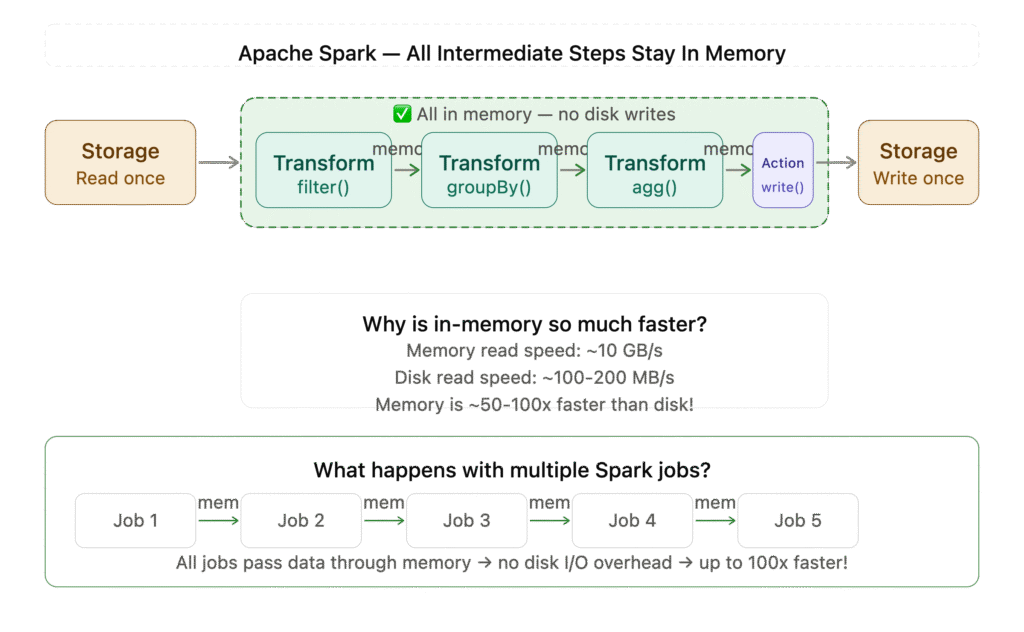
What makes Spark special? One word — speed. Spark processes data in memory rather than writing intermediate results to disk like its predecessor Hadoop MapReduce. This makes it up to 100x faster for certain workloads.
In this post we will go from the basics all the way to advanced concepts — with diagrams and real PySpark code examples throughout.
Why Spark? The Problem It Solves
Before Spark, the dominant big data tool was Hadoop MapReduce. It worked, but it had a fundamental problem — every intermediate step wrote data to disk.
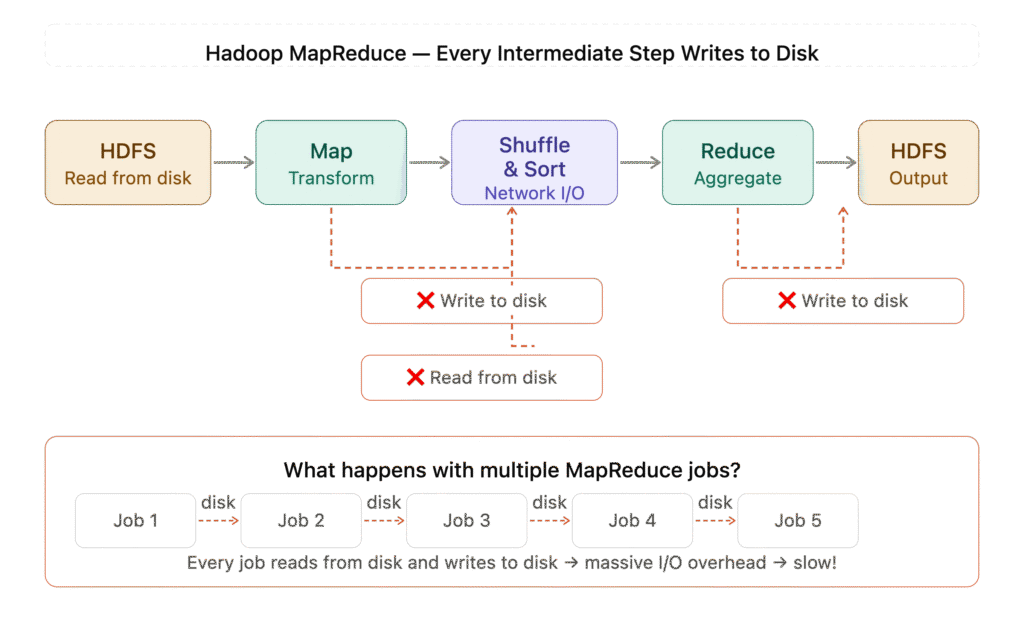
The diagram shows exactly how MapReduce suffers from disk I/O at every step:
- Top flow — Read → Map → ❌ Write to disk → Shuffle → ❌ Read from disk → Reduce → ❌ Write to disk → Output
- Bottom section — Shows what happens with multiple chained jobs — every job writes to disk and the next reads from it again. With 5 jobs that’s 10 unnecessary disk operations!
Spark changed this by keeping data in memory across steps:
Spark Architecture
Spark Architecture — shows Driver (SparkContext, DAG Scheduler, Task Scheduler), Cluster Manager (YARN/Kubernetes/Standalone), Worker Nodes with Executors and shared storage at the bottom.
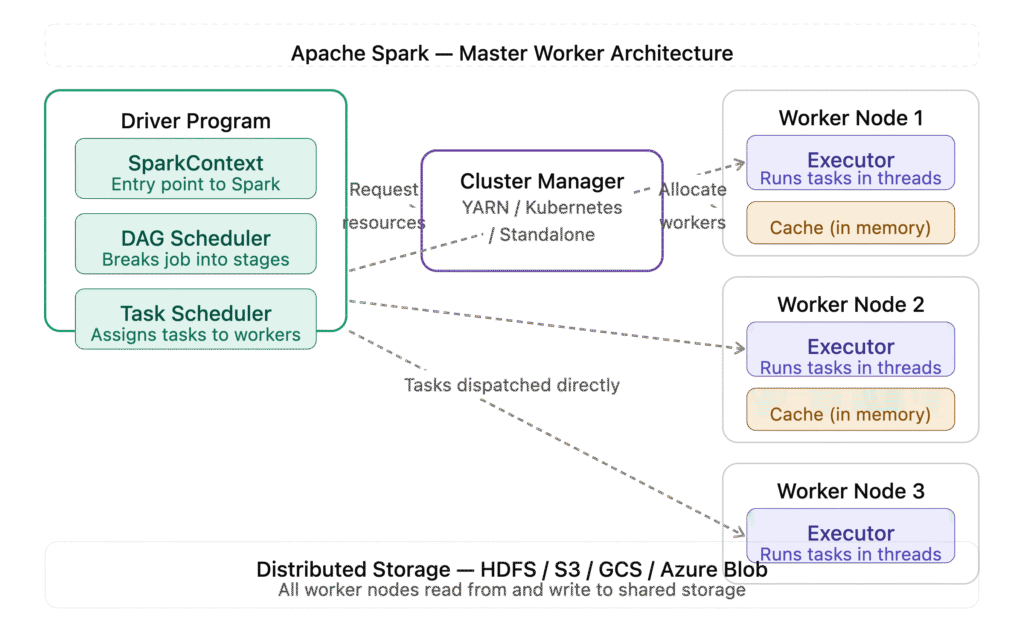
Spark follows a **master-worker architecture** with three main components:
1. Driver Program
The brain of a Spark application. It:
- Contains your application’s main() function
- Creates the SparkContext (entry point to Spark)
- Breaks your job into tasks
- Schedules tasks on executors
- Collects results
2. Cluster Manager
Manages the cluster resources. Spark supports three cluster managers:
- Standalone — Spark’s built-in cluster manager
- YARN — Hadoop’s resource manager
- Kubernetes — container-based cluster management
3. Executors
The workers of Spark. Each executor:
- Runs on a worker node in the cluster
- Executes the tasks assigned by the Driver
- Stores data in memory (cache) for fast access
- Reports status back to the Driver
Key insight for advanced engineers: The Driver is a single point of failure. In production, always use cluster mode (Driver runs inside the cluster) rather than client mode (Driver runs on your local machine).
Core Data Abstractions
Spark has evolved through three generations of data abstractions. Understanding all three is important.
1. RDD — Resilient Distributed Dataset
The original Spark data abstraction. An RDD is:
- Resilient — can recover from node failures automatically
- Distributed — data is split across multiple nodes
- Dataset — a collection of data elements
RDDs are immutable — you never modify an RDD, you create a new one from transformations.
PySpark RDD example:
from pyspark import SparkContext

sc = SparkContext("local", "RDD Example")

# Create an RDD from a list
numbers = sc.parallelize([1, 2, 3, 4, 5, 6, 7, 8, 9, 10])

# Transformation — filter even numbers (lazy, not executed yet)
even_numbers = numbers.filter(lambda x: x % 2 == 0)

# Action — collect triggers execution
result = even_numbers.collect()
print(result)  # [2, 4, 6, 8, 10]
Key concept — Lazy Evaluation: Transformations like filter(), map() and flatMap() are lazy — they are not executed until an action like collect(), count() or save() is called. Spark builds a DAG (Directed Acyclic Graph) of all transformations and optimises them before execution.
When to use RDDs:
- When you need fine-grained control over data processing
- When working with unstructured data
- When you need custom partitioning
Advanced takeaway: RDDs have no schema and no built-in optimisation. For structured data, always prefer DataFrames.
2. DataFrame
Introduced in Spark 1.3, DataFrames added schema (column names and types) to distributed data — similar to a table in a relational database or a pandas DataFrame.
DataFrames use the Catalyst Optimizer — Spark’s query optimiser that automatically rewrites your transformations for maximum efficiency.
PySpark DataFrame example:
from pyspark.sql import SparkSession

spark = SparkSession.builder \
    .appName("DataFrame Example") \
    .getOrCreate()

# Create DataFrame from data
data = [
    ("Alice", "Engineering", 85000),
    ("Bob", "Marketing", 72000),
    ("Charlie", "Engineering", 92000),
    ("Diana", "Marketing", 68000),
    ("Eve", "Engineering", 78000)
]

columns = ["name", "department", "salary"]
df = spark.createDataFrame(data, columns)

# Show the DataFrame
df.show()
# +-------+-----------+------+
# |   name| department|salary|
# +-------+-----------+------+
# |  Alice|Engineering| 85000|
# |    Bob|  Marketing| 72000|
# |Charlie|Engineering| 92000|
# |  Diana|  Marketing| 68000|
# |    Eve|Engineering| 78000|
# +-------+-----------+------+

# Filter Engineering department
engineering = df.filter(df.department == "Engineering")

# Average salary by department
from pyspark.sql.functions import avg
df.groupBy("department").agg(avg("salary").alias("avg_salary")).show()
# +-----------+------------------+
# | department|        avg_salary|
# +-----------+------------------+
# |Engineering|           85000.0|
# |  Marketing|           70000.0|
# +-----------+------------------+
Advanced takeaway: DataFrames use the Catalyst Optimizer and Tungsten execution engine under the hood. This means even badly written DataFrame code is often optimised automatically — something RDDs cannot do.
3. Dataset
Introduced in Spark 1.6, Datasets combine the best of RDDs (type safety) and DataFrames (optimisation). They are primarily used in Java and Scala — in Python (PySpark) DataFrames and Datasets are the same thing.
Spark SQL
Spark SQL allows you to query structured data using standard SQL syntax — making Spark accessible to analysts and engineers who know SQL but not Python or Scala.
PySpark SQL example:
# Register DataFrame as a temporary SQL view
df.createOrReplaceTempView("employees")

# Query using SQL
result = spark.sql("""
    SELECT
        department,
        COUNT(*) as headcount,
        AVG(salary) as avg_salary,
        MAX(salary) as max_salary
    FROM employees
    GROUP BY department
    ORDER BY avg_salary DESC
""")

result.show()
# +-----------+---------+------------------+----------+
# | department|headcount|        avg_salary|max_salary|
# +-----------+---------+------------------+----------+
# |Engineering|        3|           85000.0|     92000|
# |  Marketing|        2|           70000.0|     72000|
# +-----------+---------+------------------+----------+
Advanced takeaway: Spark SQL queries go through the same Catalyst Optimizer as DataFrame operations. The output is identical — choose whichever style your team prefers.
Transformations vs Actions
This is one of the most important concepts in Spark.
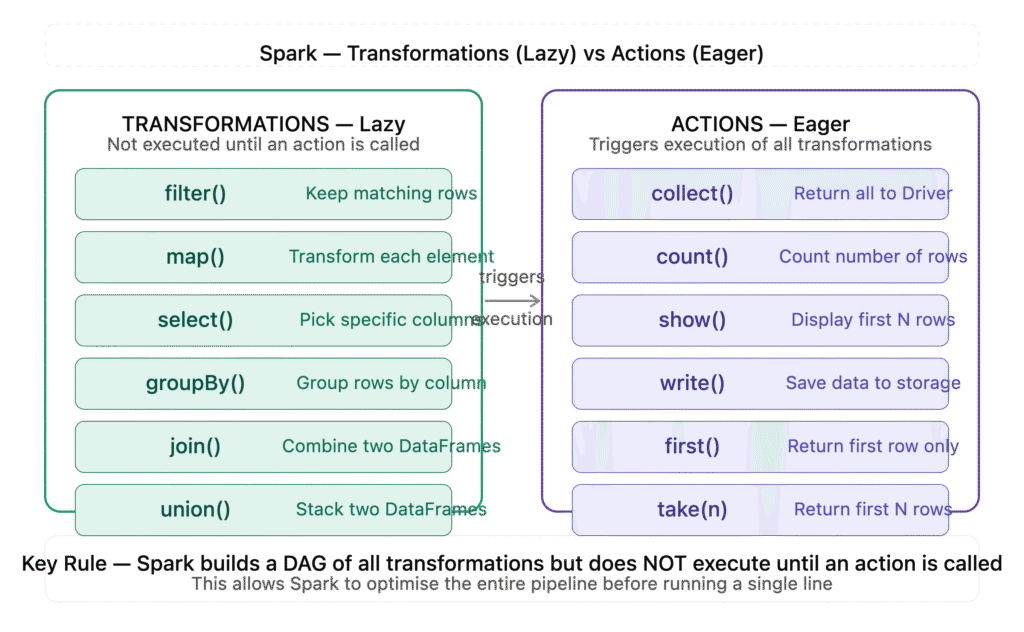
Transformations
Operations that create a new RDD/DataFrame from an existing one. They are lazy — not executed immediately.
| Transformation | Description | Example |
|---|---|---|
filter() | Keep rows matching condition | df.filter(df.age > 25) |
map() | Apply function to each element | rdd.map(lambda x: x * 2) |
select() | Select specific columns | df.select("name", "salary") |
groupBy() | Group by column values | df.groupBy("dept") |
join() | Join two DataFrames | df1.join(df2, "id") |
union() | Combine two DataFrames | df1.union(df2) |
Actions
Operations that trigger execution and return results. They are eager — executed immediately.
| Action | Description | Example |
|---|---|---|
collect() | Return all data to Driver | df.collect() |
count() | Count number of rows | df.count() |
show() | Display first N rows | df.show(10) |
write() | Save data to storage | df.write.parquet("path") |
first() | Return first row | df.first() |
take(n) | Return first N rows | df.take(5) |
Advanced takeaway: Avoid collect() on large DataFrames — it pulls all data to the Driver and can cause out-of-memory errors. Use take() or show() for sampling, and write() for saving results.
Spark Execution Model — DAG
When you call an action, Spark builds a DAG (Directed Acyclic Graph) of all transformations.
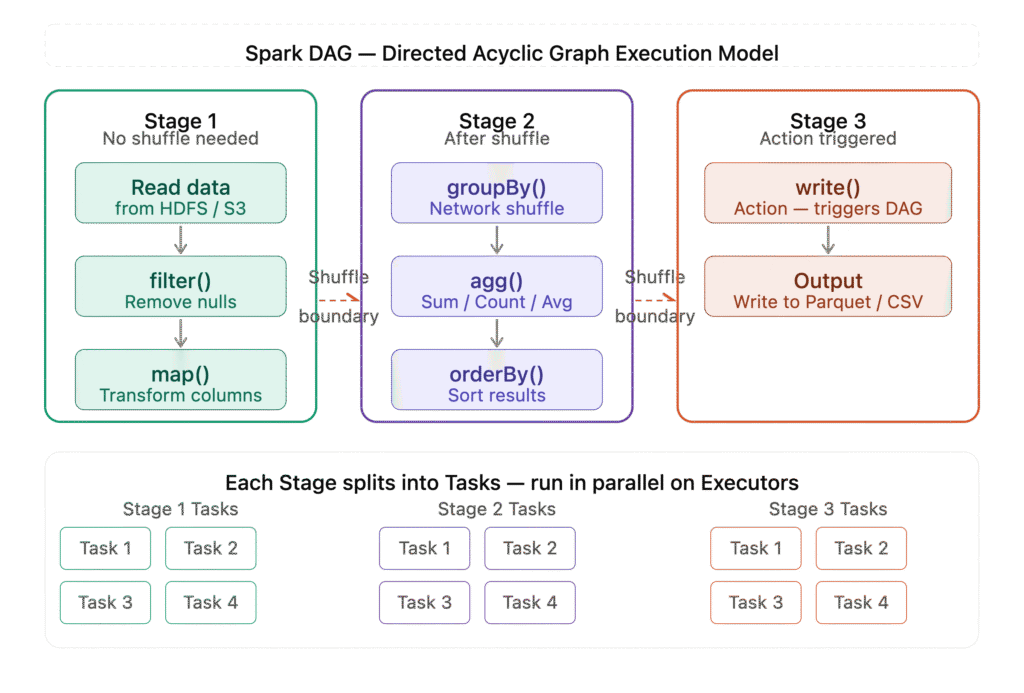
The DAG is split into Stages separated by shuffle operations (like groupBy and join). Each stage is divided into Tasks that run in parallel on executors.
Example DAG for a groupBy operation:
Stage 1:                    Stage 2:
Read data                   Shuffle & Aggregate
    ↓                           ↓
filter()     →  shuffle  →  groupBy()
    ↓                           ↓
map()                       agg()
Advanced takeaway: Minimise shuffles in your Spark jobs. Shuffles move data across the network between executors and are the most expensive operation in Spark. Use broadcast joins for small tables to avoid shuffle joins.
Real World Use Cases
1. ETL Pipelines
Read raw data from S3/HDFS → transform → write to data warehouse.
# Read raw JSON from S3
raw_df = spark.read.json("s3://bucket/raw-data/")

# Transform
cleaned_df = raw_df \
    .filter(raw_df.status == "active") \
    .select("user_id", "event_type", "timestamp") \
    .dropDuplicates()

# Write to Parquet (columnar format, fast for analytics)
cleaned_df.write \
    .mode("overwrite") \
    .partitionBy("event_type") \
    .parquet("s3://bucket/processed-data/")
2. Real-Time Streaming — Spark Streaming
Process live data streams from Kafka, Kinesis or sockets.
from pyspark.sql import SparkSession
from pyspark.sql.functions import count

spark = SparkSession.builder \
    .appName("Streaming Example") \
    .getOrCreate()

# Read from Kafka stream
stream_df = spark.readStream \
    .format("kafka") \
    .option("kafka.bootstrap.servers", "localhost:9092") \
    .option("subscribe", "orders") \
    .load()

# Count orders per minute
order_counts = stream_df \
    .groupBy("event_type") \
    .count()

# Write to console (for demo)
query = order_counts.writeStream \
    .outputMode("complete") \
    .format("console") \
    .start()

query.awaitTermination()
3. Machine Learning — MLlib
Spark’s built-in ML library scales to massive datasets.
from pyspark.ml.classification import LogisticRegression
from pyspark.ml.feature import VectorAssembler

# Prepare features
assembler = VectorAssembler(
    inputCols=["age", "salary", "tenure"],
    outputCol="features"
)

df_features = assembler.transform(df)

# Train model
lr = LogisticRegression(featuresCol="features", labelCol="churn")
model = lr.fit(df_features)

# Predict
predictions = model.transform(df_features)
predictions.select("features", "churn", "prediction").show()
Spark vs Other Tools
| Tool | Best For | Speed | Scale |
|---|---|---|---|
| Apache Spark | Batch + Streaming + ML | Very Fast | Massive |
| Hadoop MapReduce | Batch only | Slow | Massive |
| Apache Flink | Real-time streaming | Very Fast | Large |
| Pandas | Small data, local | Fast | Single machine |
| Dask | Medium data, Python | Fast | Medium |
Advanced takeaway: Spark is not always the right tool. For datasets under a few GB, pandas is simpler and faster. Use Spark when data exceeds what a single machine can handle.
Key Takeaways
For Beginners
- Spark processes data in memory — much faster than disk-based tools
- Think of DataFrames as distributed tables with SQL-like operations
- Transformations are lazy, actions trigger execution
- PySpark lets you use Python to work with massive datasets
For Advanced Engineers
- Minimise shuffles — they are the biggest performance bottleneck
- Use broadcast joins for small lookup tables
- Prefer Parquet over CSV for storage — columnar, compressed, fast
- Use DataFrame/SQL API over RDDs — Catalyst Optimizer gives free performance
- In production, always tune executor memory, cores and parallelism
- Monitor jobs via Spark UI (port 4040) — check DAG, stage timings and shuffle size
- Avoid
collect()on large data — usewrite()instead - Use partitioning wisely — too few partitions = underutilised cluster, too many = overhead
Conclusion
Apache Spark has fundamentally changed how we think about data processing at scale. What used to take hours with Hadoop MapReduce now takes minutes with Spark — and what used to require specialised expertise is now accessible through simple Python APIs.
Whether you are building ETL pipelines, processing real-time streams, training machine learning models or running analytics on terabytes of data — Spark gives you a unified framework to do it all.
The journey from beginner to advanced Spark engineer is about more than learning the API. It is about understanding how Spark thinks — lazy evaluation, the DAG, shuffles, memory management — and using that understanding to write jobs that are not just correct, but fast and reliable at scale