Event-Driven Architecture — Patterns & Real World Use
What is Covered
- What Event-Driven Architecture (EDA) is and why it matters
- Core EDA patterns — Event Notification, Event Sourcing, CQRS
- Real world use cases across industries
- When to use EDA and when NOT to
- How tools like Kafka fit into EDA
Introduction
Modern software systems are no longer simple monoliths serving a handful of users. Today’s applications need to handle millions of concurrent events, react in real time, and scale independently across services.
This is where Event-Driven Architecture (EDA) comes in.
EDA is an architectural pattern where components communicate by producing and consuming events — It is not making direct calls to each other. It decouples services, improves scalability and enables systems to react to things as they happen.
In this post we will drive deep into the core patterns of EDA, explore real world use cases, and discuss when EDA is the right choice
What is an Event?
Before diving into patterns, let’s define what an event is.
An event is a record of something that has happened in your system. It is immutable — once it happens, it cannot be undone. Examples:
OrderPlaced— a customer placed an orderPaymentProcessed— a payment was successfully chargedUserRegistered— a new user signed upInventoryUpdated— stock levels changed
Events are different from commands (which tell a service to do something) and queries (which ask for data). Events simply say: “This happened.”
Core EDA Patterns
1. Event Notification
The simplest form of EDA. A service publishes an event when something happens. Other services listen and react independently.
How it works:
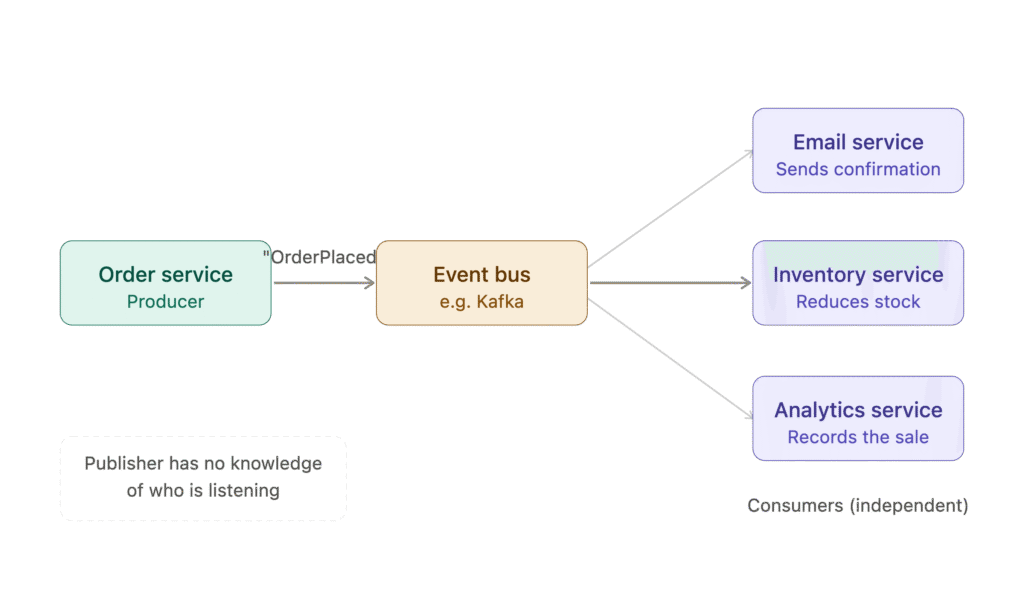
- Order Service (producer) publishes an “OrderPlaced” event
- Event Bus (Kafka) receives and distributes it
- independent consumers —
- Email – Accept the request without knowing the publisher
- Inventory – Accept the request without knowing the publisher
- Analytics – Accept the request without knowing the publisher
- The key principle — the publisher has no knowledge of who is listening
Key characteristics:
- Publisher does not know who is listening
- Consumers are completely decoupled from the producer
- Easy to add new consumers without changing the publisher
Real world example: An e-commerce platform where placing an order triggers notifications to the warehouse, email system and analytics — all independently.
When to use it:
- When you want to notify multiple systems of a state change
- When the publisher does not need a response
- When you want loose coupling between services
2. Event-Carried State Transfer
An extension of Event Notification where the event carries all the data a consumer needs — not just a notification.
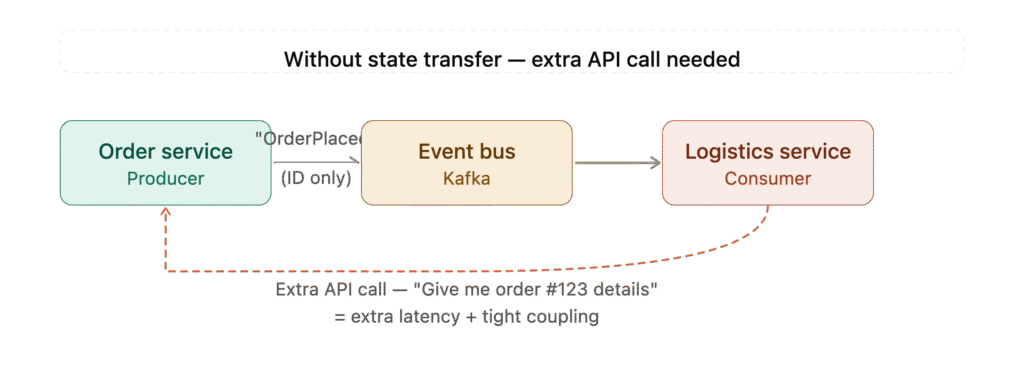
Without state transfer:
- Event only carries an Order ID
- Logistics Service has to make an extra API call back to Order Service to get the full details
- Result: extra latency + tight coupling between services
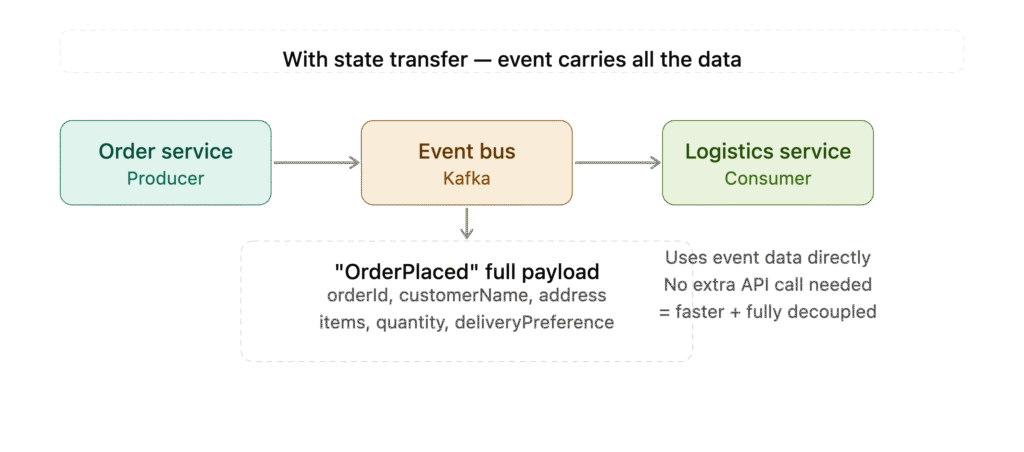
With state transfer:
- Event carries the full payload — customer name, address, items, delivery preference
- Logistics Service uses the data directly, no callback needed
- Result: faster, fully decoupled
Key characteristics:
- Events are self-contained with all necessary data
- Consumers do not need to make additional API calls
- Reduces coupling and latency
Real world example: A logistics service that receives an OrderPlaced event containing customer address, items and delivery preference — without needing to call back to the Order Service.
When to use it:
- When consumers need data immediately without further lookups
- When you want to minimise inter-service API calls
- When working with high-throughput systems
3. Event Sourcing
Instead of storing just the current state of data, Event Sourcing stores the full history of events that led to that state.
Traditional approach:
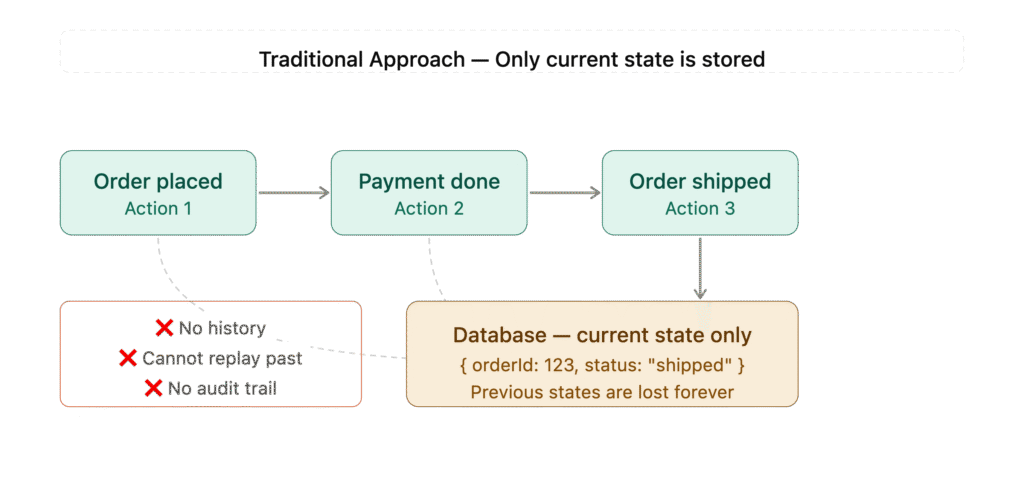
- 3 actions happen (Order Placed → Payment Done → Order Shipped)
- All of them overwrite the same database record
- The database only stores the final current state
- History is lost — no way to know how you got there
Event Sourcing approach:
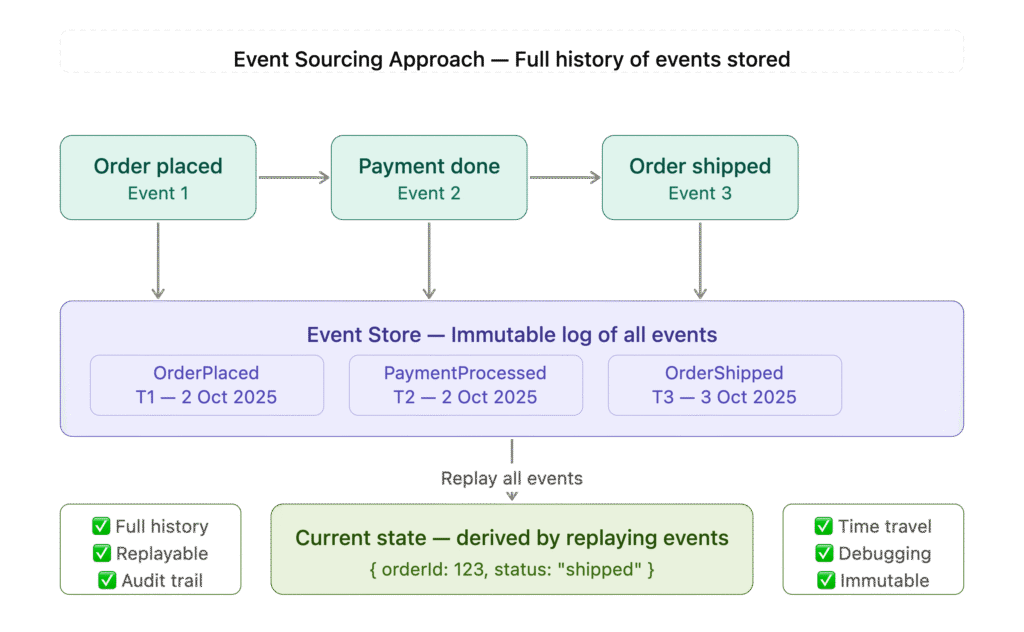
- 3 events (Order Placed, Payment Done, Order Shipped) each stored individually in the Event Store
- Event Store — an immutable log with timestamps for every event
- Replay — current state is derived by replaying all events in order
- Benefits — full history, replayable, audit trail, time travel debugging
Key characteristics:
- Complete audit trail of everything that happened
- You can rebuild state at any point in time
- Natural fit for event-driven systems
Real world example: Banking systems where every transaction is stored as an immutable event. The account balance is derived by summing all credits and debits — not stored directly.
When to use it:
- When you need a full audit trail (finance, healthcare, legal)
- When you need the ability to replay history
- When debugging requires understanding “how did we get here?”
When NOT to use it:
- Simple CRUD applications where history does not matter
- When your team is not familiar with the pattern — steep learning curve
4. CQRS — Command Query Responsibility Segregation
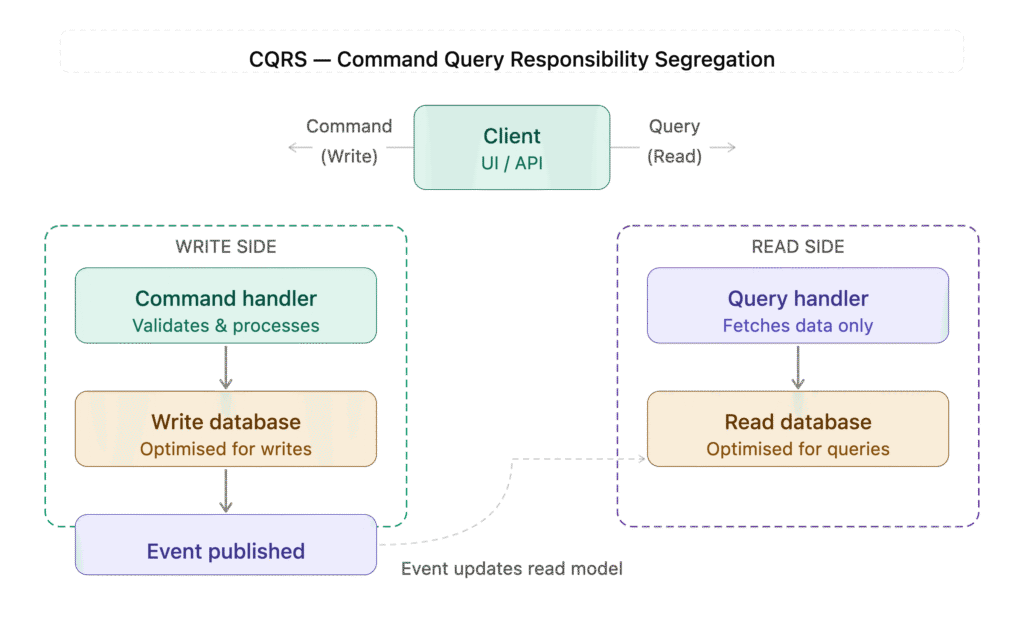
CQRS separates the write side (commands that change state) from the read side (queries that return data).
Key characteristics:
- Write and read models are completely separate
- Read models can be optimised for specific query patterns
- Often used together with Event Sourcing
Real world example: A ride-sharing app where:
- Write side handles booking, cancellation, payment commands
- Read side serves highly optimised queries for driver locations, trip history, pricing
When to use it:
- High read-to-write ratio systems
- When read and write workloads have different scaling needs
- Complex domains where a single model is too complex
5. Saga Pattern
The Saga pattern manages long-running transactions across multiple services in an event-driven way — without using distributed transactions.
Two types of Sagas:
Choreography-based Saga:
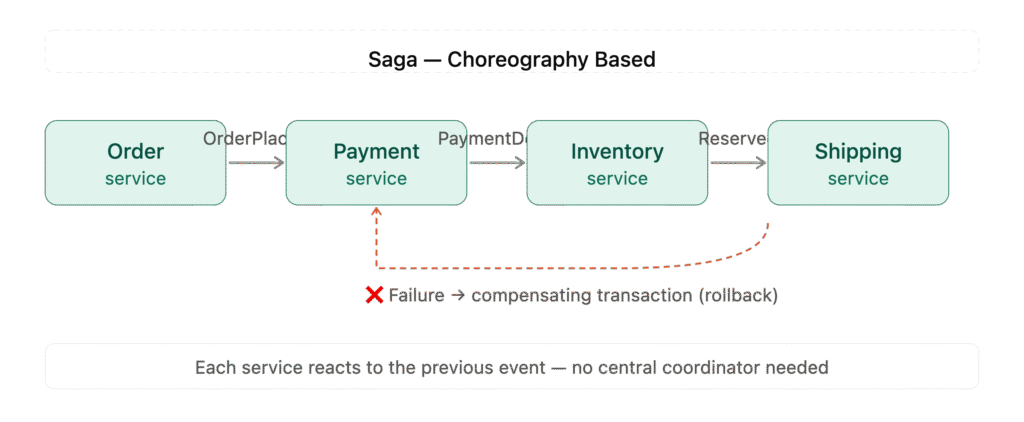
Choreography — services talk to each other through events, no central control. Simple but harder to track failures.
Orchestration-based Saga:
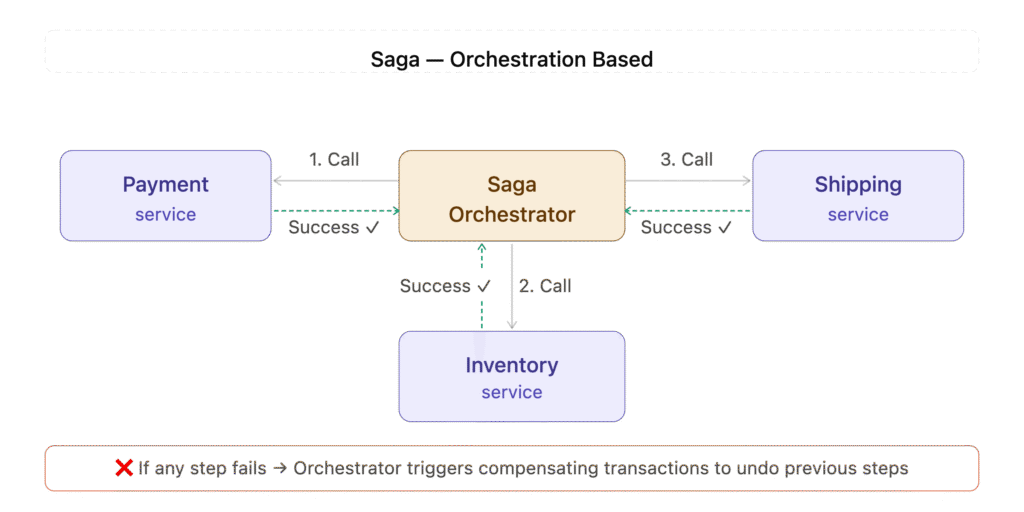
Orchestration — one central Saga Orchestrator calls each service in order (1→2→3), waits for success response, and handles failures with compensating transactions. More control, easier to debug.
Real world example: Hotel booking system where booking a trip involves:
- Reserving a hotel
- Booking a flight
- Charging payment If any step fails, compensating transactions undo previous steps.
When to use it:
- Multi-step business processes spanning multiple services
- When distributed transactions (2PC) are not an option
- When you need compensating logic for failures
Real World Use Cases
E-Commerce
- Order placement triggers inventory, payment, notification and analytics events
- Returns trigger refund, inventory restocking and customer notification flows
- Personalisation engines react to browsing and purchase events in real time
Financial Services
- Every transaction stored as an immutable event (Event Sourcing)
- Fraud detection systems react to payment events in milliseconds
- Account statements derived by replaying transaction history
Ride Sharing (Uber, Ola)
- Driver location events published every few seconds
- Trip events trigger billing, notifications and driver ratings
- Surge pricing calculated from real-time demand events
IoT and Smart Devices
- Sensors publish temperature, pressure and motion events continuously
- Systems react to threshold breaches in real time
- Historical event replay used for predictive maintenance
Where Kafka Fits In
Apache Kafka is the most widely used event streaming platform for EDA. It acts as the central nervous system of an event-driven architecture.
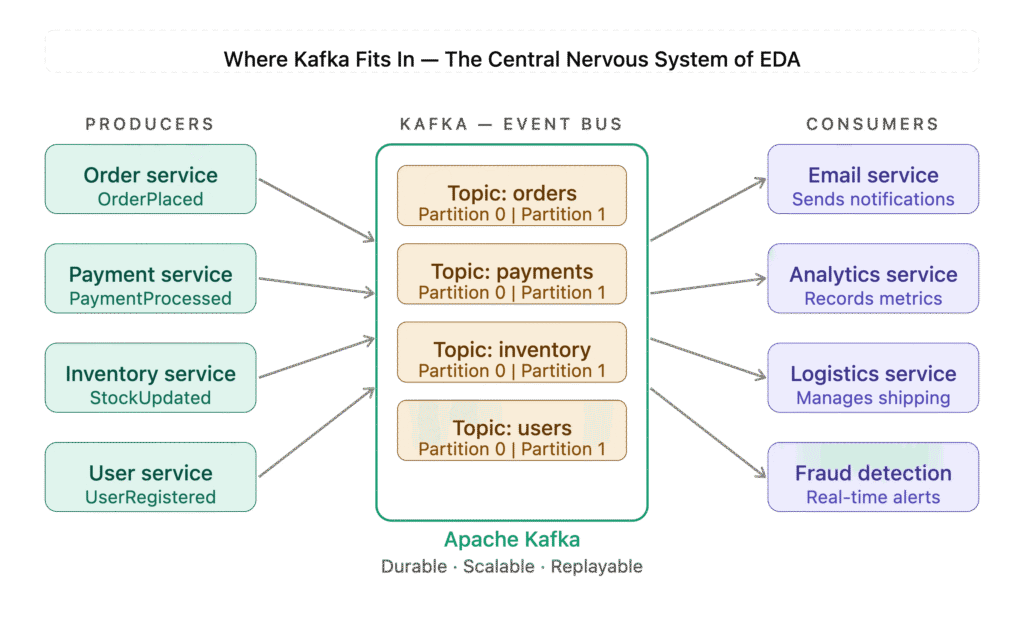
- Producers (left) — Order, Payment, Inventory and User services publishing events
- Kafka (center) — 4 topics each with partitions for scalability. Durable, scalable and replayable
- Consumers (right) — Email, Analytics, Logistics and Fraud Detection each independently consuming from relevant topics
Why Kafka for EDA:
- High throughput — handles millions of events per second
- Durability — events stored on disk, not lost if consumers are down
- Replay — consumers can re-read events from any point
- Scalability — partitions allow horizontal scaling
- Decoupling — producers and consumers are completely independent
If you have already read our post on Kafka Insight, you will recognise how naturally Kafka supports EDA patterns — especially Event Notification and Event Sourcing.
When to Use EDA — and When NOT To
✅ Use EDA When:
- You have multiple services reacting to the same business event
- You need real-time data processing
- You want loose coupling between services
- You need scalability and independent deployments
- You require a full audit trail of state changes
❌ Avoid EDA When:
- Simple applications with few services
- When eventual consistency is not acceptable (EDA is async by nature)
- Small teams without EDA experience — steep learning curve
- When debugging complexity is a concern (tracing events across services is hard)
- Simple CRUD apps where direct API calls are sufficient
Common Pitfalls to Avoid
1. Event Schema Changes Once events are published and consumed by multiple services, changing the schema is painful. Always version your events.
2. Event Ordering In distributed systems, events may arrive out of order. Design your consumers to handle this gracefully.
3. Duplicate Events Network issues can cause events to be published multiple times. Design consumers to be idempotent — processing the same event twice should produce the same result.
4. Debugging Complexity Tracing a business flow across multiple services and events requires good tooling — distributed tracing (Jaeger, Zipkin) and centralised logging are essential.
5. Eventual Consistency EDA is inherently asynchronous. Your system will be eventually consistent — not immediately. This is a fundamental trade-off you must accept.
Conclusion
Event-Driven Architecture is not just a pattern — it is a mindset shift in how you think about building systems.
When you move from direct service calls to events, you stop thinking about “who needs to know about this?” and start thinking about “what just happened?” — and that simple shift unlocks a fundamentally different level of scalability, resilience and flexibility.
The five patterns we covered — Event Notification, Event-Carried State Transfer, Event Sourcing, CQRS and the Saga Pattern — are not competing ideas. They are complementary tools in your architecture toolkit. A real world system will often use several of them together:
- Event Notification to decouple services
- Event-Carried State Transfer to eliminate unnecessary API calls
- Event Sourcing for a complete audit trail
- CQRS to scale reads and writes independently
- Saga to manage complex multi-step business transactions
The key is knowing when to apply which pattern — and equally important, knowing when NOT to apply EDA at all. Not every system needs this complexity. If you are building a simple CRUD application with two services, direct API calls are perfectly fine.
But if you are building systems that need to scale to millions of events, react in real time, evolve independently and recover gracefully from failures — Event-Driven Architecture is not optional. It is the foundation.